
Your mail. Your Mac.
Clear your inbox. Keep every email.
Stow downloads years of Gmail and Outlook mail into an encrypted, searchable archive on your Mac. Then you can free up space, or keep less online, without losing a thing.
Coming soon for Macs with Apple silicon. €30 once, with a 14-day free trial. Pricing.
Stow only reads your mail and keeps it on your Mac. Read the privacy policy.

Sound familiar?
- "Your Google storage is almost full."
- Paying every month to store mail you never open.
- Scared to delete in case you need it one day.
- Fifteen years of private letters, sitting on someone else's servers.
Stow fixes all four, on your Mac.
Three steps. Then it looks after itself.
-
1. Add your accounts
Sign in to Gmail, Microsoft 365 or Outlook.com. From then on, Stow only ever reads.
-
2. Stow brings your mail home
Every message and attachment downloads to an encrypted archive on your Mac. Your personal mail comes first.
-
3. Search, then tidy
Find anything in seconds. When you're ready, Stow shows you what is safely archived and how to clear it from your mailbox.
Everything you've ever kept. Nothing you have to keep online.
-
Every email, safely at home
Years of mail and attachments from all your accounts, stored on your Mac.
-
Find anything in seconds
One search across every account. Works offline, and looks inside PDFs and documents.
-
See what's clutter
Stow spots the newsletters and bulk mail taking up space, shows you why, and lets you decide.
-
Delete without the fear
Stow tells you when a message is safely archived, so clearing your mailbox is no risk. You do the deleting.
-
Keep less in the cloud
Keep the last few months online and the rest at home. Less for Google or Microsoft to hold.
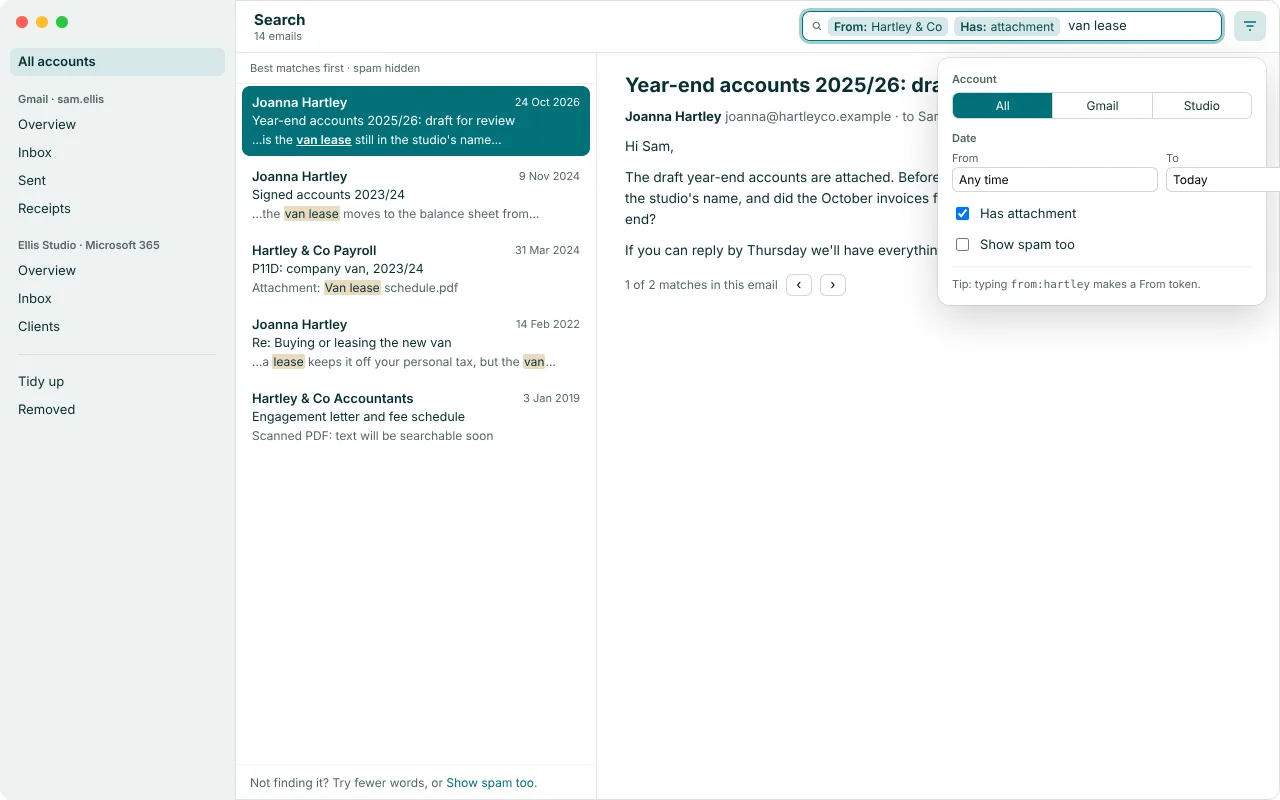
Twenty years of email, one search away.
Type a few words, add a sender or "has attachment", and Stow searches every account at once, even offline.
Your mail comes home. Nothing goes back.
Stow is a one-way trip. Mail travels from Google or Microsoft straight to your Mac, and none of it travels back: not to your mailbox, not to us, not to the cloud.
-
It only reads
Stow never sends, changes or deletes anything in your mailbox. It doesn't even mark messages as read.
-
There is no Stow server
Your mail never passes through us, because we don't have anywhere to put it.
-
Encrypted on your Mac
Everything Stow saves is encrypted, with the keys in your Mac's Keychain. It refuses to save into iCloud Drive, Dropbox and similar folders.
-
Only you hold the key
You get a recovery key at setup to open your archive on a new Mac. We never see it, so we can't open your mail.
Made by one person who needed it
Hi, I'm [Toby]. I built Stow after [the moment: for example, my Google storage hit 100% and I couldn't bring myself to delete 15 years of mail]. I wanted my history safe on my own Mac, searchable, and out of everyone else's cloud.
Stow is a paid app, so it never needs your data, ads or tracking to stay in business.
[Toby], maker of Stow · [toby@getstow.ee]
€30, once. Your history for good.
- 14-day free trial with everything working, starting the first time you open Stow
- Every 1.x update included
- One licence for up to 3 Macs
- No subscription, no account with us. Sold through Polar.
Try it all first. After the trial, search, reading and export keep working; only new syncing pauses.
Launch price: €20 for everyone for the first 4 weeks. Join the waitlist and I'll email you the day it starts.
For Macs with Apple silicon, macOS 14 or later. Not on sale yet.
Questions, answered plainly
Why does Google say Stow can "read, compose, send and permanently delete" my email?
That is Google's standard wording for the only permission that lets an app download your mail over IMAP. Apple Mail gets the same screen. Stow only reads: it has no code that sends, changes or deletes anything in your mailbox.
Does my mail go through your servers?
No. There is no Stow server. Your mail goes from Google or Microsoft straight to your Mac.
Which accounts work?
Gmail, Microsoft 365 and Outlook.com. For a work or school account, your organisation's administrator may need to approve Stow first. Stow is for your personal and own-business mail.
Which Macs does Stow run on?
Macs with Apple silicon (M1 or later), running macOS 14 or later.
How long does the first download take?
A large mailbox can take a few days, because Gmail limits how fast apps can download. Stow fetches your personal mail first.
If I delete mail from Gmail, is it gone from Stow?
No. Once a message is in Stow, it stays on your Mac. It won't be on your phone any more, so keep online whatever you need on the go.
What if I lose or replace my Mac?
At setup you get a recovery key. With it and a copy of your archive, you can open your mail on a new Mac. We never see the key, so we can't recover your mail for you. Keep it somewhere safe.
Can I keep my archive in iCloud Drive or Dropbox?
No, on purpose. Stow refuses cloud-synced folders so your archive never ends up in someone else's cloud.
Is Stow open source?
The engine that syncs, encrypts and searches is free and open source under Apache 2.0, on GitHub. The Mac app is €30, once.
What's included for €30?
The Mac app, every 1.x update, and a 14-day free trial first. No subscription.
What if it's not for me?
Try everything free for 14 days before you buy, so purchases aren't refunded. If you're charged twice or a paid licence won't activate, email support and we'll fix it. This doesn't affect your rights under the consumer law that applies to you. See refunds.
Bring your email home.
Stow is in development and coming soon to the Mac. Join the waitlist and I'll email you once, the day it launches, with the launch price.